Введение
Интеграция локальных языковых моделей непосредственно в интерфейс Wazuh открывает принципиально новые возможности для команд информационной безопасности. В отличие от облачных AI-решений, Ollama позволяет выполнять анализ событий безопасности полностью в изолированной инфраструктуре организации, исключая передачу конфиденциальных данных за периметр сети. Встраивание AI-ассистента в дашборд Wazuh обеспечивает аналитикам SOC мгновенный доступ к интеллектуальной интерпретации алертов, автоматическую корреляцию инцидентов и генерацию рекомендаций по реагированию непосредственно в контексте рабочего процесса. Такой подход существенно сокращает время на первичный анализ угроз и снижает когнитивную нагрузку на специалистов, позволяя им сосредоточиться на принятии стратегических решений вместо рутинной обработки событий. При этом полный контроль над моделью и данными остается внутри организации, что критически важно для соответствия требованиям регуляторов и внутренним политикам безопасности.
Предварительные требования и настройка окружения
- Docker
- Wazuh Docker repository
- Ollama Wazuh model, подробнее о моделе
Установка и настройка Ollama для Wazuh
Для простоты настройки мы будем использовать Docker Compose, чтобы быстро развернуть Ollama и подключить его к Wazuh.
Настройка и запуск Wazuh
В первую очередь необходимо склонировать репозиторий. Будем использовать Wazuh 4.14.2.
git clone https://github.com/wazuh/wazuh-docker.git -b v4.14.2
Так как это POC, будем использовать Wazuh single node.
Перейдем в директорию cd wazuh-docker/single-node/ и сгенерируем сертификаты:
docker compose -f generate-indexer-certs.yml run --rm generator
Проверим, что все сертификаты на месте:
tree -D -L 3
[Jan 21 09:19]  .
├── [Jan 21 09:19]  README.md
├── [Jan 21 09:20]  config
│   ├── [Jan 21 09:19]  certs.yml
│   ├── [Jan 21 09:19]  wazuh_cluster
│   │   └── [Jan 21 09:19]  wazuh_manager.conf
│   ├── [Jan 21 09:19]  wazuh_dashboard
│   │   ├── [Jan 21 09:19]  opensearch_dashboards.yml
│   │   └── [Jan 21 09:19]  wazuh.yml
│   ├── [Jan 21 09:19]  wazuh_indexer
│   │   ├── [Jan 21 09:19]  internal_users.yml
│   │   └── [Jan 21 09:19]  wazuh.indexer.yml
│   └── [Jan 21 09:20]  wazuh_indexer_ssl_certs
│       ├── [Jan 21 09:20]  admin-key.pem
│       ├── [Jan 21 09:20]  admin.pem
│       ├── [Jan 21 09:20]  root-ca-manager.key
│       ├── [Jan 21 09:20]  root-ca-manager.pem
│       ├── [Jan 21 09:20]  root-ca.key
│       ├── [Jan 21 09:20]  root-ca.pem
│       ├── [Jan 21 09:20]  wazuh.dashboard-key.pem
│       ├── [Jan 21 09:20]  wazuh.dashboard.pem
│       ├── [Jan 21 09:20]  wazuh.indexer-key.pem
│       ├── [Jan 21 09:20]  wazuh.indexer.pem
│       ├── [Jan 21 09:20]  wazuh.manager-key.pem
│       └── [Jan 21 09:20]  wazuh.manager.pem
├── [Jan 21 09:19]  docker-compose.yml
└── [Jan 21 09:19]  generate-indexer-certs.yml
Для теста запустим и проверим, что Wazuh Dashboard доступен:
docker compose up -d
Проверяем статус контейнеров:
docker compose ps
NAME                            IMAGE                          COMMAND                  SERVICE           CREATED          STATUS          PORTS
single-node-wazuh.dashboard-1   wazuh/wazuh-dashboard:4.14.2   "/entrypoint.sh"         wazuh.dashboard   24 seconds ago   Up 23 seconds   0.0.0.0:443->5601/tcp, [::]:443->5601/tcp
single-node-wazuh.indexer-1     wazuh/wazuh-indexer:4.14.2     "/entrypoint.sh open…"   wazuh.indexer     28 seconds ago   Up 23 seconds   0.0.0.0:9200->9200/tcp, [::]:9200->9200/tcp
single-node-wazuh.manager-1     wazuh/wazuh-manager:4.14.2     "/init"                  wazuh.manager     28 seconds ago   Up 23 seconds   0.0.0.0:1514-1515->1514-1515/tcp, [::]:1514-1515->1514-1515/tcp, 0.0.0.0:514->514/udp, [::]:514->514/udp, 0.0.0.0:55000->55000/tcp, [::]:55000->55000/tcp
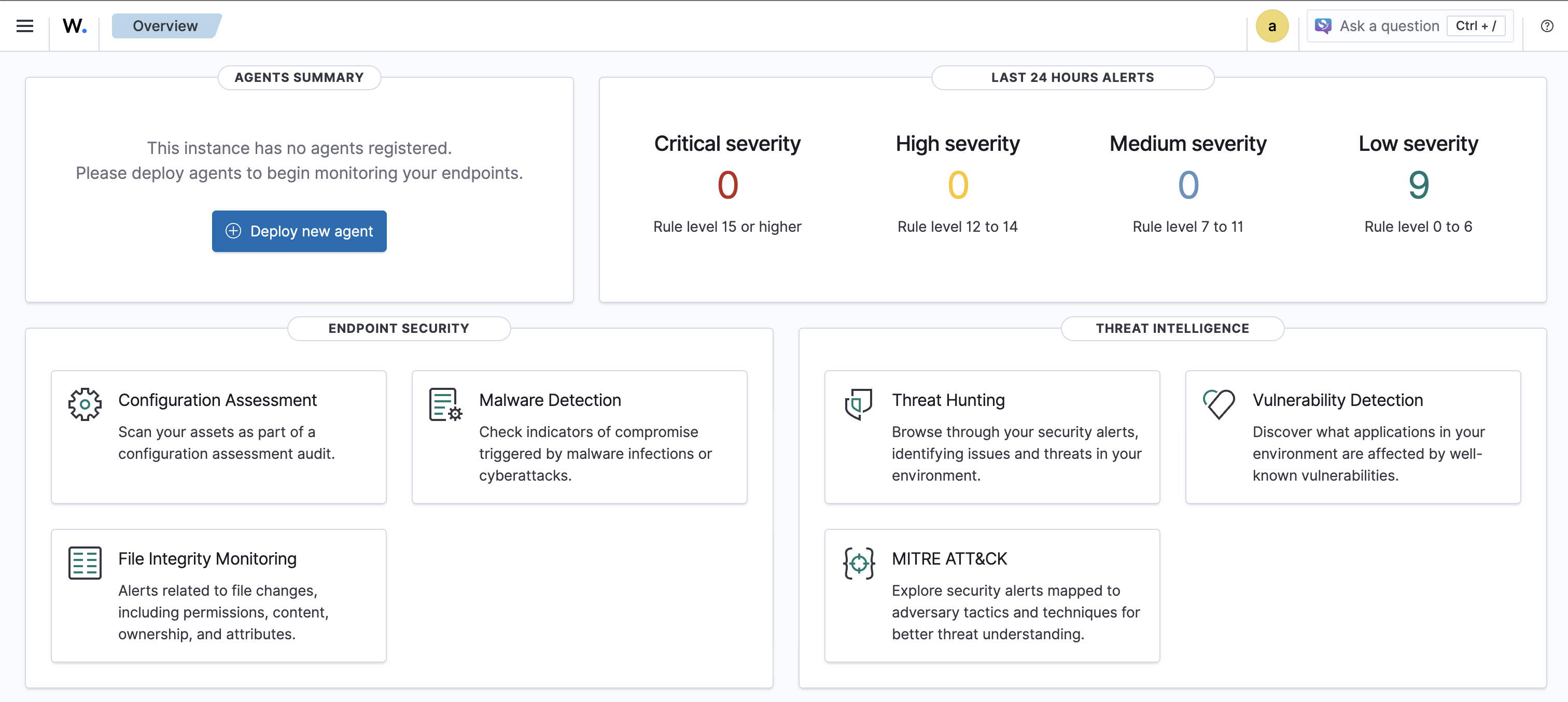
Проверить доступность можно, открыв в браузере по адресу https://localhost:443, логин и пароль можно подсмотреть в docker-compose.yml
После того как вы получили рабочий Wazuh single node, начинаем интеграцию с Ollama.
Настройка и запуск Ollama
Для простоты интеграции будем использовать тот же docker-compose.yml, что и для Wazuh.
Добавляем новый сервис
  ollama:
    image: ollama/ollama:latest
    ports:
      - "8080:11434"
    container_name: ollama
    tty: true
    restart: always
    entrypoint: ["/usr/bin/bash", "/entrypoint.sh"]
    environment:
      - OLLAMA_KEEP_ALIVE=-1
      - OLLAMA_NUM_PARALLEL=2
      - OLLAMA_HOST=0.0.0.0
    volumes:
      - .:/code
      - ./ollama/ollama:/root/.ollama
      - ./scripts/entrypoint.sh:/entrypoint.sh
Создаем папку ./scripts/ и entrypoint.sh
#!/bin/bash
/bin/ollama serve &
pid=$!
sleep 5
ollama pull OpenNix/wazuh-llama-3.1-8B-v1
wait $pid
Сам entrypoint нужен для автоматического запуска Ollama с нужной моделью. На самом деле это опционально и модель может быть выбрана вручную.
Проверяем все вместе запускаем docker-compose
docker compose up -d
Пул модели займет какое-то время, но по итогу модель должна быть доступна
docker compose exec ollama ollama ls
NAME                                    ID              SIZE      MODIFIED
OpenNix/wazuh-llama-3.1-8B-v1:latest    a453c6e1d4aa    4.7 GB    7 seconds ago
Теперь давайте попробуем что-нибудь спросить у модели:
docker compose exec ollama ollama run OpenNix/wazuh-llama-3.1-8B-v1 "Analyze this Wazuh alert: SSH login from 192.168.1.100 to root account"

Rule Level: 12 - [High importance event]

Event Type: SSH login attempt

Detailed Reasoning: "The rule level of 12 indicates that this is a high-priority alert. The user's language input was English, so I will provide my response in English as well.

The Wazuh alert suggests that there has been an SSH login attempt from the IP address 192.168.1.100 to the root account on your system. This could be a potential security threat if the login was not
authorized or if the user is attempting to gain unauthorized access to your system.

Risk Assessment: "High risk - this alert requires immediate attention as it may indicate unauthorized access to your system."

Recommended Actions:

* Investigate the source of the SSH login attempt (192.168.1.100)
* Check the authentication logs to see if the login was successful or not
* Review the system's security policies and ensure they are up-to-date and enforced
* Consider implementing additional security measures such as rate limiting, account lockouts, or two-factor authentication

Investigation Guidance: "To investigate this alert, follow these steps:

1. Check the system logs for any signs of unauthorized access or suspicious activity.
2. Review the system's configuration to ensure that SSH is properly configured and not vulnerable to exploits.
3. Verify that the IP address 192.168.1.100 is a trusted source or has been blacklisted.
4. Investigate the user account that was attempted to be logged in as (root) to see if it has any security risks associated with it.

MITRE ATT&CK: "T1071 - Application Layer Protocol"

This rule matches one of the techniques identified by MITRE ATT&CK, which involves using legitimate protocols and tools for malicious purposes. In this case, the attacker is attempting to use SSH (a
legitimate protocol) to gain unauthorized access to the system.

Overall, this alert requires immediate attention as it may indicate unauthorized access to your system."
Интеграция Ollama с Wazuh Dashboard
Установка плагинов для Wazuh Dashboard и Wazuh Indexer
В первую очередь необходимо установить нужные OpenSearch плагины, для Wazuh v4.14.2 нужно скачать opensearch-dashboards v2.19.4
Создаем локально папку для плагинов
mkdir config/wazuh_dashboard/plugins
Скачиваем и распаковываем
curl https://artifacts.opensearch.org/releases/bundle/opensearch-dashboards/2.19.4/opensearch-dashboards-2.19.4-linux-x64.tar.gz -o opensearch-dashboards.tar.gz
tar -xvzf opensearch-dashboards.tar.gz
Копируем плагины
cp -r opensearch-dashboards-2.19.4/plugins/observabilityDashboards config/wazuh_dashboard/plugins/
cp -r opensearch-dashboards-2.19.4/plugins/mlCommonsDashboards config/wazuh_dashboard/plugins/
cp -r opensearch-dashboards-2.19.4/plugins/assistantDashboards config/wazuh_dashboard/plugins/
Следующим шагом необходимо настроить volumes c новыми плагинами:
- ./config/wazuh_dashboard/plugins/assistantDashboards:/usr/share/wazuh-dashboard/plugins/assistantDashboards
- ./config/wazuh_dashboard/plugins/mlCommonsDashboards:/usr/share/wazuh-dashboard/plugins/mlCommonsDashboards
- ./config/wazuh_dashboard/plugins/observabilityDashboards:/usr/share/wazuh-dashboard/plugins/observabilityDashboards
Сервис для Wazuh Dashboard будет выглядеть примерно так
  wazuh.dashboard:
    image: wazuh/wazuh-dashboard:4.14.2
    hostname: wazuh.dashboard
    restart: always
    ports:
      - 443:5601
    environment:
      - INDEXER_USERNAME=admin
      - INDEXER_PASSWORD=SecretPassword
      - WAZUH_API_URL=https://wazuh.manager
      - DASHBOARD_USERNAME=kibanaserver
      - DASHBOARD_PASSWORD=kibanaserver
      - API_USERNAME=wazuh-wui
      - API_PASSWORD=MyS3cr37P450r.*-
    volumes:
      - ./config/wazuh_indexer_ssl_certs/wazuh.dashboard.pem:/usr/share/wazuh-dashboard/certs/wazuh-dashboard.pem
      - ./config/wazuh_indexer_ssl_certs/wazuh.dashboard-key.pem:/usr/share/wazuh-dashboard/certs/wazuh-dashboard-key.pem
      - ./config/wazuh_indexer_ssl_certs/root-ca.pem:/usr/share/wazuh-dashboard/certs/root-ca.pem
      - ./config/wazuh_dashboard/opensearch_dashboards.yml:/usr/share/wazuh-dashboard/config/opensearch_dashboards.yml
      - ./config/wazuh_dashboard/wazuh.yml:/usr/share/wazuh-dashboard/data/wazuh/config/wazuh.yml
      - wazuh-dashboard-config:/usr/share/wazuh-dashboard/data/wazuh/config
      - wazuh-dashboard-custom:/usr/share/wazuh-dashboard/plugins/wazuh/public/assets/custom
      - ./config/wazuh_dashboard/plugins/assistantDashboards:/usr/share/wazuh-dashboard/plugins/assistantDashboards
      - ./config/wazuh_dashboard/plugins/mlCommonsDashboards:/usr/share/wazuh-dashboard/plugins/mlCommonsDashboards
      - ./config/wazuh_dashboard/plugins/observabilityDashboards:/usr/share/wazuh-dashboard/plugins/observabilityDashboards
    depends_on:
      - wazuh.indexer
    links:
      - wazuh.indexer:wazuh.indexer
      - wazuh.manager:wazuh.manager
Следующим шагом надо изменить opensearch_dashboards.yml и включить следующее
assistant.chat.enabled: true
observability.query_assist.enabled: true
opensearch.requestTimeout: 300000
opensearch.shardTimeout: 300000
opensearch.pingTimeout: 300000
Теперь настало время установить нужные плагины для Wazuh indexer
mkdir -p ./config/wazuh_indexer/plugins

cd ./config/wazuh_indexer/plugins

curl -L -O https://repo1.maven.org/maven2/org/opensearch/plugin/opensearch-flow-framework/2.19.4.0/opensearch-flow-framework-2.19.4.0.zip
curl -L -O https://repo1.maven.org/maven2/org/opensearch/plugin/opensearch-skills/2.19.4.0/opensearch-skills-2.19.4.0.zip
mkdir -p opensearch-flow-framework
mkdir -p opensearch-skills
unzip opensearch-flow-framework-2.19.4.0.zip -d opensearch-flow-framework/
unzip opensearch-skills-2.19.4.0.zip -d opensearch-skills/

rm -f *.zip
После распаковки архивов нужно внести изменения в docker-compose.yml и добавить нужные volumes
- ./config/wazuh_indexer/plugins/opensearch-flow-framework:/usr/share/wazuh-indexer/plugins/opensearch-flow-framework
- ./config/wazuh_indexer/plugins/opensearch-skills:/usr/share/wazuh-indexer/plugins/opensearch-skills
Сохраняем изменения и перезапускаем все
docker compose up -d --force-recreate
Настройка Wazuh Dashboard для работы с Ollama
Открываем в браузере Wazuh Dashboard:

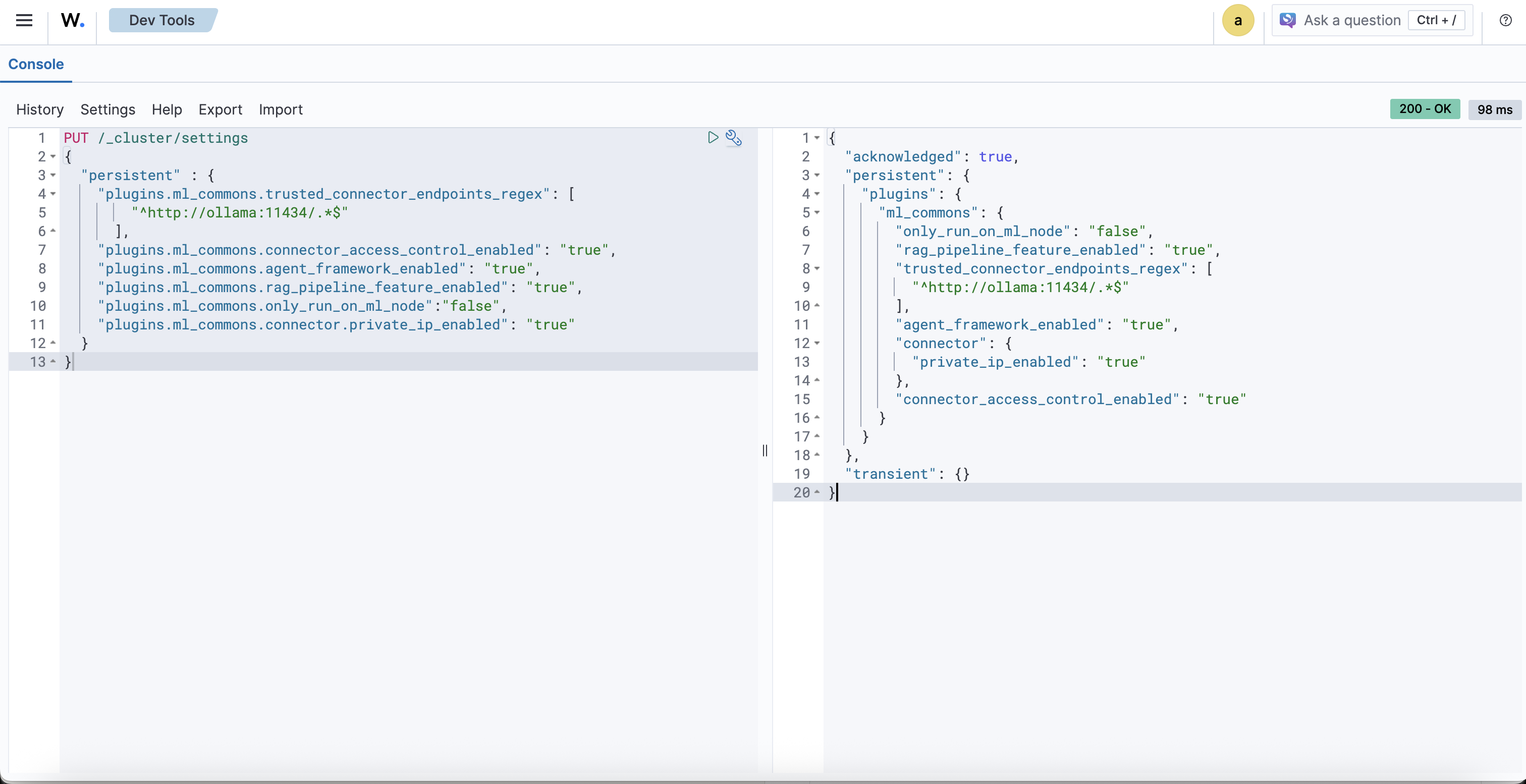
Переходим в Indexer management > DevTools и настроим, чтобы ML-задачи запускались на любой из нод (в контексте single-node это не критично).
PUT /_cluster/settings
{
  "persistent" : {
    "plugins.ml_commons.trusted_connector_endpoints_regex": [
        "^http://ollama:11434/.*$"
      ],
    "plugins.ml_commons.connector_access_control_enabled": "true",
    "plugins.ml_commons.agent_framework_enabled": "true",
    "plugins.ml_commons.rag_pipeline_feature_enabled": "true",
    "plugins.ml_commons.only_run_on_ml_node":"false",
    "plugins.ml_commons.connector.private_ip_enabled": "true"
  }
}
После запуска будет примерно такой ответ
{
  "acknowledged": true,
  "persistent": {
    "plugins": {
      "ml_commons": {
        "only_run_on_ml_node": "false",
        "rag_pipeline_feature_enabled": "true",
        "trusted_connector_endpoints_regex": [
          "^http://ollama:11434/.*$"
        ],
        "agent_framework_enabled": "true",
        "connector": {
          "private_ip_enabled": "true"
        },
        "connector_access_control_enabled": "true"
      }
    }
  },
  "transient": {}
}

Теперь нужно создать Connector для работы с Ollama
POST /_plugins/_ml/connectors/_create
{
    "name": "Ollama Wazuh Connector",
    "description": "Ollama Wazuh Connector for Wazuh SIEM platform",
    "version": 1,
    "protocol": "http",
    "parameters": {
      "endpoint": "ollama",
      "port": "11434",
      "model": "OpenNix/wazuh-llama-3.1-8B-v1"
    },
    "credential": {
      "api_key": ""
    },
    "actions": [
      {
        "action_type": "predict",
        "method": "POST",
        "url": "http://${parameters.endpoint}:${parameters.port}/v1/chat/completions",
        "headers": {
          "Content-Type": "application/json"
        },
        "request_body": "{\"model\":\"${parameters.model}\",\"messages\":[{\"role\":\"system\",\"content\":\"You are a helpful cybersecurity assistant specialized in Wazuh SIEM platform.\"},{\"role\":\"user\",\"content\":\"${parameters.prompt}\"}],\"stream\":false}"
      }
    ]
}
Как результат вы должны получить connector_id, обязательно сохраните его.
{
  "connector_id": "2v_b35sBQi0m6e1zQLUF"
}
Создаем model group
POST /_plugins/_ml/model_groups/_register
{
    "name": "Ollama Model Group",
    "description": "Model group for Ollama models"
}
После выполнения вы должны получить примерно такой ответ
{
  "model_group_id": "2__b35sBQi0m6e1zQbVT",
  "status": "CREATED"
}
Не забудьте сохранить model_group_id
Зарегистрируйте и разверните модель в ранее созданной группе моделей
POST /_plugins/_ml/models/_register?deploy=true
{
    "name": "Ollama model",
    "function_name": "remote",
    "model_group_id": "<model_group_id>",
    "description": "Ollama OpenNix Model",
    "connector_id": "<connector_id>"
}
После выполнения вы получите примерно такой ответ
{
  "task_id": "3P_b35sBQi0m6e1zQbXG",
  "status": "CREATED",
  "model_id": "3f_b35sBQi0m6e1zQbXk"
}
Обязательно сохраните model_id
Теперь можно попробовать что-нибудь спросить у модели, например:
POST /_plugins/_ml/models/<model_id>/_predict
{
  "parameters": {
    "prompt": "What is Wazuh?"
  }
}
Примерный ответ:
{
  "inference_results": [
    {
      "output": [
        {
          "name": "response",
          "dataAsMap": {
            "id": "chatcmpl-620",
            "object": "chat.completion",
            "created": 1768988594,
            "model": "OpenNix/wazuh-llama-3.1-8B-v1",
            "system_fingerprint": "fp_ollama",
            "choices": [
              {
                "index": 0,
                "message": {
                  "role": "assistant",
                  "content": """Wazuh is a popular open-source Security Information and Event Management (SIEM) platform that provides real-time monitoring, threat detection, and incident response capabilities to help organizations protect themselves against cyber threats.

Wazuh was originally developed by Pablo Soto in 2009, and it has since become one of the leading SIEM platforms on the market. It's widely used by various industries, including healthcare, finance, education, and government agencies.

Some of the key features of Wazuh include:

1. **Real-time monitoring**: Wazuh continuously monitors system logs, network traffic, and other data sources to identify potential security threats.
2. **Threat detection**: Wazuh uses rules-based and machine learning-based approaches to detect known and unknown threats, including malware, suspicious network activity, and anomalies in system behavior.
3. **Incident response**: Wazuh provides tools for responding to detected incidents, such as alerting administrators, blocking IP addresses, or quarantining affected systems.
4. **Integration with other tools**: Wazuh can integrate with a wide range of security-related tools and platforms, including firewalls, intrusion detection systems (IDSs), and ticketing systems.

Some of the benefits of using Wazuh include:

1. **Improved incident response**: By detecting potential threats early on, Wazuh helps organizations respond quickly to incidents before they escalate into major problems.
2. **Enhanced security monitoring**: Wazuh provides comprehensive visibility into system logs and network traffic, enabling organizations to better understand their security posture and identify potential vulnerabilities.
3. **Reduced regulatory risks**: By leveraging Wazuh's compliance features, organizations can demonstrate that they're taking a proactive approach to security and compliance.

Wazuh is highly customizable and has a large community of developers and users who contribute to its development and support. If you'd like to learn more about how Wazuh can help your organization improve its cybersecurity posture, I'm here to guide you!"""
                },
                "finish_reason": "stop"
              }
            ],
            "usage": {
              "prompt_tokens": 36,
              "completion_tokens": 401,
              "total_tokens": 437
            }
          }
        }
      ],
      "status_code": 200
    }
  ]
}
После того как проверили, что все работает, пора создать агента.
POST _plugins/_ml/agents/_register
{
  "name": "wazuh_agent",
  "type": "conversational",
  "description": "AI-powered assistant for Wazuh security event analysis and platform guidance",
  "llm": {
    "model_id": "<model_id>",
    "parameters": {
      "max_iteration": 5,
      "stop_when_no_tool_found": true,
      "response_filter": "$.choices[0].message.content",
      "system_instruction": "You are an expert cybersecurity analyst assistant specialized in the Wazuh SIEM platform. Your role is to help security analysts understand and respond to security events, configure Wazuh effectively, and provide actionable security guidance. When analyzing alerts, focus on providing context about the threat, potential impact, and recommended response actions. Always prioritize clarity and actionability in your responses.",
      "prompt": "\n\nHuman: ${parameters.question}\n\nAssistant:"
    }
  },
  "memory": {
    "type": "conversation_index"
  },
  "tools": [
    {
      "type": "SearchIndexTool",
      "name": "WazuhAlertsSearch",
      "description": "Search through Wazuh security alerts and events. Use this tool when the user asks about specific alerts, security events, or wants to analyze patterns in security data.",
      "parameters": {
        "index": "wazuh-alerts-*",
        "source_field": ["rule.description", "rule.level", "agent.name", "data.srcip", "data.dstip", "timestamp"]
      }
    },
    {
      "type": "CatIndexTool",
      "name": "IndexInformation",
      "description": "Get information about available Wazuh indices. Use this when you need to understand what data is available or check index health."
    }
  ],
  "app_type": "os_chat"
}
Примерный ответ
{
  "agent_id": "ks0a4JsBX6ITrL3aNQNr"
}
Не забудьте сохранить agent_id
Теперь давайте протестируем агента
POST _plugins/_ml/agents/<agent_id>/_execute
{
  "parameters": {
    "question": "Who are you?",
    "verbose": false
  }
}
Примерный ответ
{
  "inference_results": [
    {
      "output": [
        {
          "name": "memory_id",
          "result": "gs0D4JsBX6ITrL3aEwMW"
        },
        {
          "name": "parent_interaction_id",
          "result": "g80D4JsBX6ITrL3aEwOB"
        },
        {
          "name": "response",
          "dataAsMap": {
            "response": """{"id":"chatcmpl-580","object":"chat.completion","created":1.768989947E9,"model":"OpenNix/wazuh-llama-3.1-8B-v1","system_fingerprint":"fp_ollama","choices":[{"index":0.0,"message":{"role":"assistant","content":"I\u0027m an artificial intelligence designed to assist you with Wazuh, a powerful and flexible Security Information and Event Management (SIEM) system. My purpose is to help users like you monitor, detect, and respond to security threats in their environments.\n\nWhat can I do for you? Would you like me to:\n\n1. **Provide configuration guidance**: Share best practices or troubleshoot Wazuh installation and configuration?\n2. **Troubleshoot an issue**: Help resolve problems with Wazuh, such as agent connectivity issues, agent configuration errors, or alert fatigue?\n3. **Develop a security strategy**: Offer insights on how to use Wazhu for threat detection, compliance monitoring, and incident response?\n4. **Code-level support**: Assist with writing custom rules or plugins for Wazhu, or provide expertise in script-based solutions?\n\nPlease let me know how I can best assist you!"},"finish_reason":"stop"}],"usage":{"prompt_tokens":38.0,"completion_tokens":181.0,"total_tokens":219.0}}""",
            "additional_info": {}
          }
        }
      ]
    }
  ]
}
После создания агента его нужно подключить к OpenSearch Assistant
Выполняем:
docker compose exec wazuh.indexer curl -k -X PUT \
  "https://localhost:9200/.plugins-ml-config/_doc/os_chat" \
  --cert /usr/share/wazuh-indexer/config/certs/admin.pem \
  --key /usr/share/wazuh-indexer/config/certs/admin-key.pem \
  --cacert /usr/share/wazuh-indexer/config/certs/root-ca.pem \
  -H "Content-Type: application/json" \
  -d '{
    "type": "os_chat_root_agent",
    "configuration": {
      "agent_id": "<agent_id>"
    }
  }'
Результат должен быть
{
   "_index":".plugins-ml-config",
   "_id":"os_chat",
   "_version":2,
   "result":"updated",
   "_shards":{
      "total":1,
      "successful":1,
      "failed":0
   },
   "_seq_no":2,
   "_primary_term":14
}
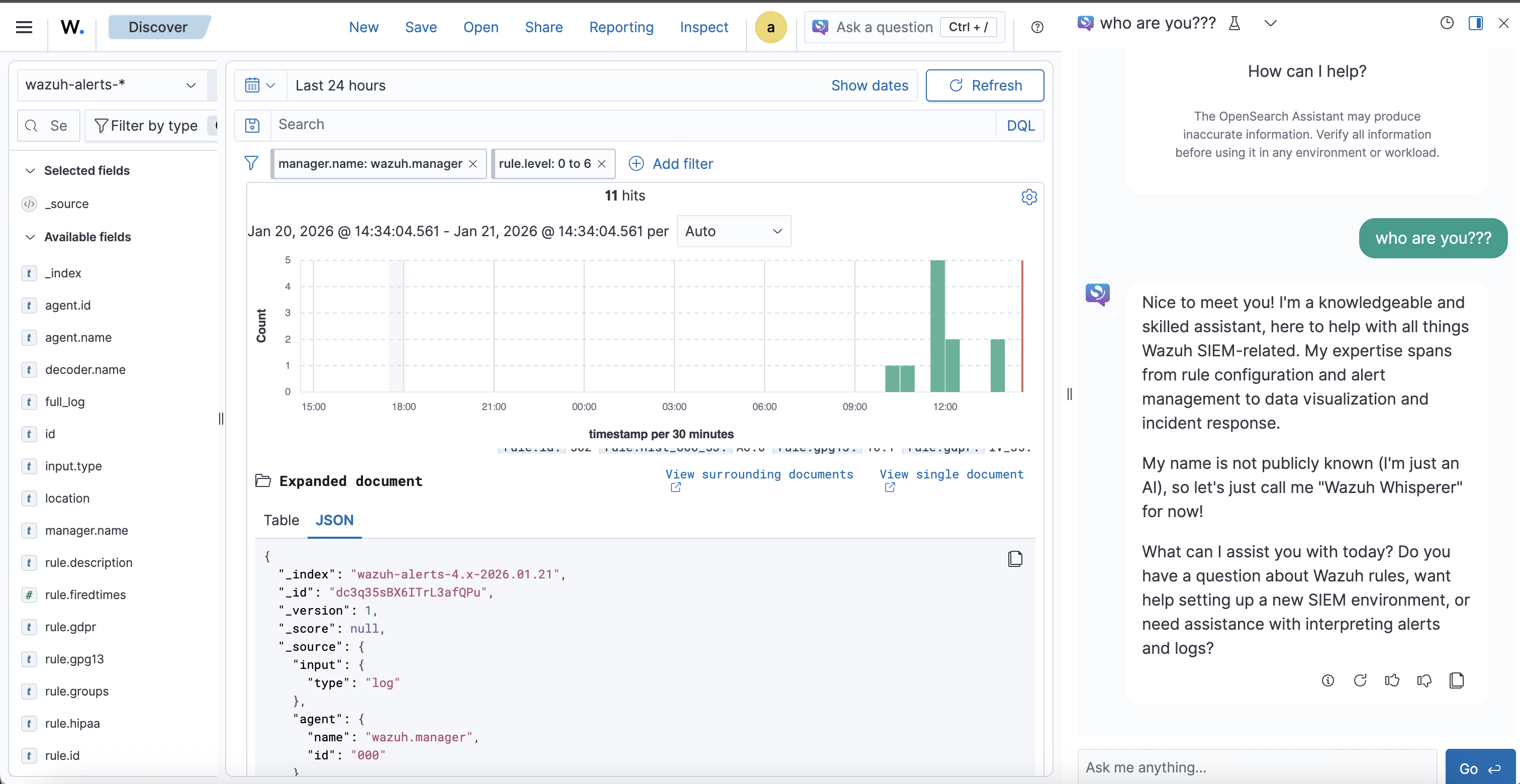
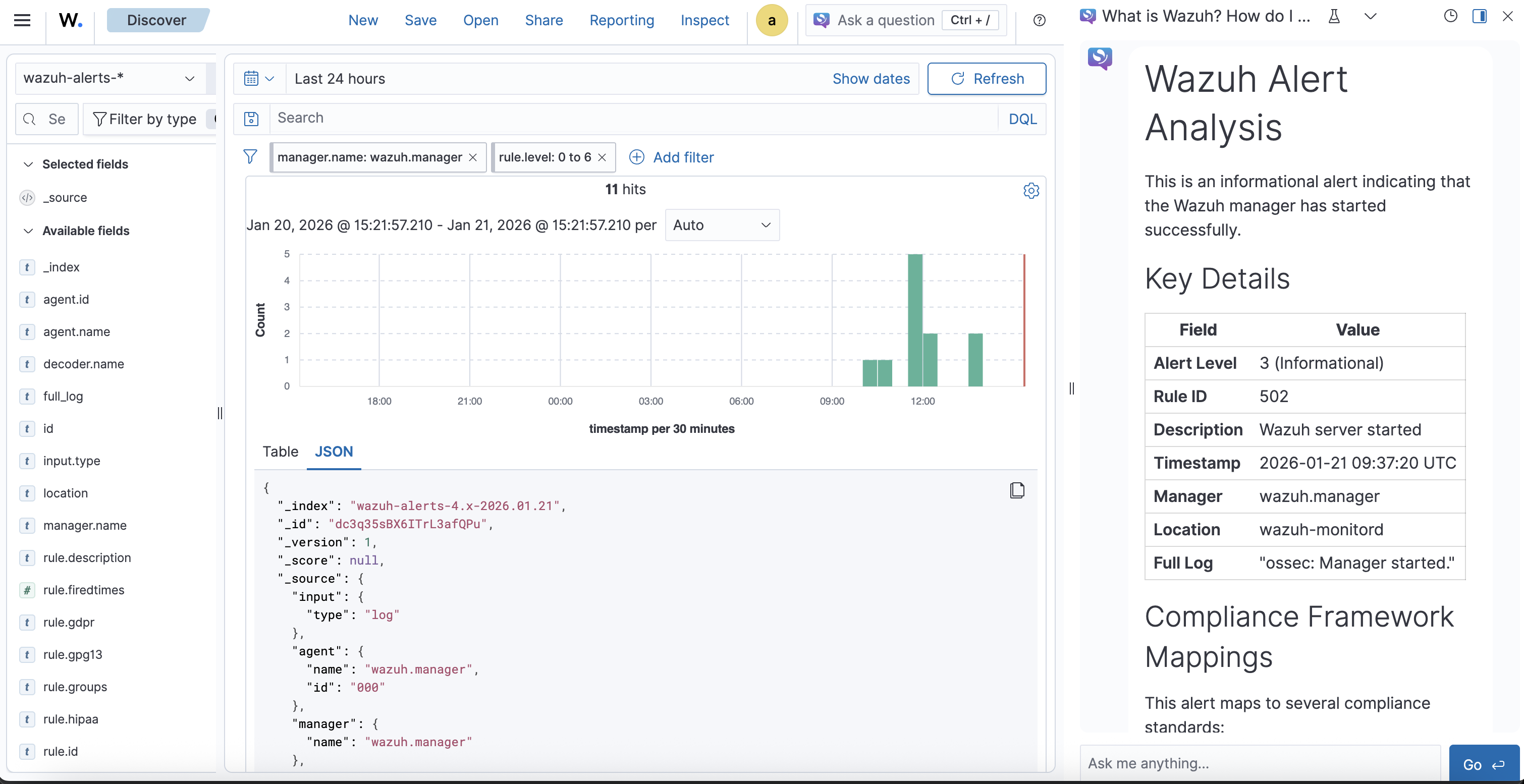
На этом интеграция закончена и можно пользоваться агентом, чат доступен в верхнем правом углу.

Использование Ollama cloud
Ollama cloud дает доступ к премиум моделям к таким как gpt-oss,deepseek-v3.1,minimax-m2.1 и многим другим
Плюс заключается в том, что модель запускается на инфраструктуре Ollama и бесплатный план достаточно не плох.
Прежде чем интегрировать Ollama cloud, необходимо:
- Создать учетную запись
- Создать ключ доступа
Конфигурация и интеграция мало отличается от интеграции с обычным REST API Ollama.
Настройка Cluster Settings
Переходим в Indexer management > DevTools и настроим, чтобы ML-задачи запускались на любой из нод (в контексте single-node это не критично).
PUT /_cluster/settings
{
  "persistent" : {
    "plugins.ml_commons.trusted_connector_endpoints_regex": [
        "^http://ollama:11434/.*$",
        "^https://ollama\\.com/.*$"
      ],
    "plugins.ml_commons.connector_access_control_enabled": "true",
    "plugins.ml_commons.agent_framework_enabled": "true",
    "plugins.ml_commons.rag_pipeline_feature_enabled": "true",
    "plugins.ml_commons.only_run_on_ml_node":"false",
    "plugins.ml_commons.connector.private_ip_enabled": "true"
  }
}
Ответ
{
  "acknowledged": true,
  "persistent": {
    "plugins": {
      "ml_commons": {
        "only_run_on_ml_node": "false",
        "rag_pipeline_feature_enabled": "true",
        "trusted_connector_endpoints_regex": [
          "^http://ollama:11434/.*$",
          """^https://ollama\.com/.*$"""
        ],
        "agent_framework_enabled": "true",
        "connector": {
          "private_ip_enabled": "true"
        },
        "connector_access_control_enabled": "true"
      }
    }
  },
  "transient": {}
}
Создание ML Connector для Ollama Cloud
POST _plugins/_ml/connectors/_create
{
  "name": "Ollama Cloud Connector",
  "description": "Connector to Ollama Cloud API",
  "version": 1,
  "protocol": "http",
  "parameters": {
    "endpoint": "ollama.com",
    "model": "minimax-m2.1",
    "response_filter": "$.message.content"
  },
  "credential": {
    "api_key": "ВАШ_API_KEY"
  },
  "actions": [
    {
      "action_type": "predict",
      "method": "POST",
      "url": "https://${parameters.endpoint}/api/chat",
      "headers": {
        "Content-Type": "application/json",
        "Authorization": "Bearer ${credential.api_key}"
      },
      "request_body": "{\"model\":\"${parameters.model}\",\"messages\":[{\"role\":\"user\",\"content\":\"${parameters.prompt}\"}],\"stream\":false}"
    }
  ]
}
Ответ
{
  "connector_id": "ps0x4JsBX6ITrL3afAP0"
}
Создание Model Group
POST _plugins/_ml/model_groups/_register
{
  "name": "Ollama Cloud Models",
  "description": "Model group for Ollama Cloud integration"
}
Ответ
{
  "model_group_id": "qc0y4JsBX6ITrL3aewNC",
  "status": "CREATED"
}
Регистрация модели
POST _plugins/_ml/models/_register
{
  "name": "Ollama Cloud MiniMax M2.1",
  "function_name": "remote",
  "model_group_id": "<model_group_id>",
  "description": "MiniMax M2.1 model via Ollama Cloud",
  "connector_id": "<connector_id>"
}
Ответ
{
  "task_id": "qs004JsBX6ITrL3aBQO4",
  "status": "CREATED",
  "model_id": "q8004JsBX6ITrL3aBQPb"
}
Тестирование модели
Делаем запрос
POST _plugins/_ml/models/<model_id>/_predict
{
  "parameters": {
    "prompt": "What is Wazuh?"
  }
}
Примерный ответ
{
  "inference_results": [
    {
      "output": [
        {
          "name": "response",
          "dataAsMap": {
            "response": """**Wazuh** is an open-source **security platform** used for threat detection, security monitoring, incident response, and compliance management. It's widely used by organizations of all sizes to protect their IT environments.

Here's a breakdown of what Wazuh does and its key aspects:

1.  **Core Functionality (What it does):**
    *   **Log Analysis:** Collects, parses, normalizes, and analyzes logs from a vast array of sources (operating systems, applications, network devices, cloud services, firewalls, IDS/IPS).
    *   **File Integrity Monitoring (FIM):** Continuously monitors critical system files and directories for unauthorized changes, helping detect malware or intrusions.
    *   **Vulnerability Detection:** Scans systems and applications to identify known security weaknesses.
    *   **Threat Detection & Response:** Uses signature-based (rules) and anomaly-based detection techniques to identify security threats like attacks, malware, and suspicious activities. Includes capabilities for active response (e.g., blocking an IP).
    *   **Security Configuration Assessment (SCA):** Checks systems against security benchmarks (like CIS) to ensure hardening compliance.
    *   **Incident Management:** Helps correlate events and investigate security incidents.
    *   **Compliance Reporting:** Generates reports for compliance standards like PCI DSS, GDPR, HIPAA, NIST, and others.

2.  **Key Components (How it works):**
    *   **Wazuh Manager:** The central component that receives, processes, and analyzes security data from agents. It manages the agents, stores alerts, and runs correlation and analysis engines.
    *   **Wazuh Agents:** Lightweight software deployed on endpoints (servers, workstations, cloud instances - Linux, Windows, macOS) to collect security data. Agents perform local tasks like log analysis, FIM, SCA, and active response, then send relevant data to the Manager. Agents can also run independently in agentless mode for certain devices.
    *   **Wazuh Indexer:** A highly scalable search and analytics engine used to store, index, and correlate large volumes of security events and alerts. Based on OpenSearch (a fork of Elasticsearch).
    *   **Wazuh Dashboard:** A web-based interface for visualizing security data, managing the Wazuh platform, monitoring alerts, conducting investigations, and generating reports. Built on OpenSearch Dashboards.

3.  **Architecture:**
    *   Agents collect data from endpoints.
    *   Agents send data to the Manager.
    *   The Manager analyzes data using rules (based on OSSEC) and correlation engines.
    *   Processed data and alerts are forwarded to the Indexer for storage and indexing.
    *   The Dashboard queries the Indexer to present a unified view of the security posture.

4.  **Capabilities & Use Cases:**
    *   **Threat Detection:** Identify known attack signatures, suspicious patterns, and anomalous behavior.
    *   **Incident Response:** Investigate alerts, understand attack chains, and trigger automated responses.
    *   **Compliance:** Automate the monitoring and reporting needed for various regulatory standards.
    *   **Cloud Security:** Monitor cloud environments (AWS, Azure, GCP) and containers (Docker, Kubernetes) for security issues.
    *   **Endpoint Detection and Response (EDR):** Offers foundational EDR capabilities like FIM, process monitoring, and response actions.

5.  **Open-Source Ecosystem & Extensibility:**
    *   Built on the foundation of the widely used OSSEC HIDS (Host-based Intrusion Detection System).
    *   Highly extensible with a rich set of built-in integrations and APIs.
    *   Allows users to create custom rules, decoders, and integrations.
    *   Benefits from a large community contributing rules, scripts, and integrations.
    *   Integrates seamlessly with the Elastic Stack (Elasticsearch, Kibana/Discover, Logstash - often used interchangeably, though Wazuh recommends its own Indexer/Dashboard stack for optimized performance) for powerful data visualization and analysis (though Wazuh can be used independently).

**In essence, Wazuh acts as a comprehensive Security Information and Event Management (SIEM) and Host-based Intrusion Detection System (HIDS) solution, providing organizations with deep visibility into their security landscape across physical, virtual, cloud, and containerized environments.** It's a popular, powerful, and flexible alternative to commercial SIEM solutions."""
          }
        }
      ],
      "status_code": 200
    }
  ]
}
Создание агента
POST _plugins/_ml/agents/_register
{
  "name": "wazuh_agent_ollama_cloud",
  "type": "conversational",
  "description": "AI-powered assistant for Wazuh security event analysis",
  "llm": {
    "model_id": "q8004JsBX6ITrL3aBQPb",
    "parameters": {
      "max_iteration": 5,
      "stop_when_no_tool_found": true,
      "response_filter": "$.message.content",
      "system_instruction": "You are an expert cybersecurity analyst assistant specialized in the Wazuh SIEM platform. Your role is to help security analysts understand and respond to security events, configure Wazuh effectively, and provide actionable security guidance. When analyzing alerts, focus on providing context about the threat, potential impact, and recommended response actions. Always prioritize clarity and actionability in your responses.",
      "prompt": "\n\nHuman: ${parameters.question}\n\nAssistant:"
    }
  },
  "memory": {
    "type": "conversation_index"
  },
  "tools": [
    {
      "type": "SearchIndexTool",
      "name": "WazuhAlertsSearch",
      "description": "Search through Wazuh security alerts and events. Use this tool when the user asks about specific alerts, security events, or wants to analyze patterns in security data.",
      "parameters": {
        "index": "wazuh-alerts-*",
        "source_field": ["rule.description", "rule.level", "agent.name", "data.srcip", "data.dstip", "timestamp"]
      }
    },
    {
      "type": "CatIndexTool",
      "name": "IndexInformation",
      "description": "Get information about available Wazuh indices. Use this when you need to understand what data is available or check index health."
    }
  ],
  "app_type": "os_chat"
}
Ответ
{
  "agent_id": "uM1H4JsBX6ITrL3aqANb"
}
Подключение агента к OpenSearch Assistant
Выполняем:
docker compose exec wazuh.indexer curl -k -X PUT \
  "https://localhost:9200/.plugins-ml-config/_doc/os_chat" \
  --cert /usr/share/wazuh-indexer/config/certs/admin.pem \
  --key /usr/share/wazuh-indexer/config/certs/admin-key.pem \
  --cacert /usr/share/wazuh-indexer/config/certs/root-ca.pem \
  -H "Content-Type: application/json" \
  -d '{
    "type": "os_chat_root_agent",
    "configuration": {
      "agent_id": "<agent_id>"
    }
  }'
Ответ
{
   "_index":".plugins-ml-config",
   "_id":"os_chat",
   "_version":3,
   "result":"updated",
   "_shards":{
      "total":1,
      "successful":1,
      "failed":0
   },
   "_seq_no":3,
   "_primary_term":14
}
На этом настройка завершена. Пример работы чата с Ollama Cloud:

Заключение
В данном руководстве мы рассмотрели два варианта интеграции AI-ассистента в Wazuh Dashboard: локальную установку Ollama и использование Ollama Cloud. Оба подхода позволяют существенно повысить эффективность анализа событий безопасности, предоставляя аналитикам SOC инструмент для быстрой интерпретации алертов и получения рекомендаций по реагированию.
Локальная установка обеспечивает полный контроль над данными и соответствие требованиям безопасности, в то время как Ollama Cloud предоставляет доступ к более мощным моделям без необходимости выделения вычислительных ресурсов.
Полезные ссылки
- Интеграция Wazuh с Ollama: Часть 1
- Интеграция Wazuh с Ollama: Часть 2
- Интеграция Wazuh с Ollama: Часть 3
- Интеграция Wazuh с Ollama: Часть 4
- AI-модели для кибербезопасности
- RAG для документации Wazuh: Часть 1
- RAG для документации Wazuh: Часть 2
- Wazuh Docker Repository
- Ollama Wazuh Model
- OpenSearch ML Commons Documentation
Навигация по серии Wazuh + Ollama:
- Часть 1: Введение в интеграцию
- Часть 2: Настройка интеграции
- Часть 3: Расширенная конфигурация
- Часть 4: Продвинутые сценарии
- Локальная Ollama в дашборде Wazuh (текущая статья)